Free Cloud, no subscriptionShips within 3 working daysOrder →

Home / Your Suntaic inverter, from anywhere

Cloud Access · 100% Free

Your Suntaic inverter, from anywhere

MoniWatt for Suntaic shows the inverter on your network. With the free Cloud it follows you everywhere.

  • €0for the Cloud, forever
  • 3 yearsof history, CSV export
  • ≈ 2 minbetween two readings

Open the live demo Sign in →

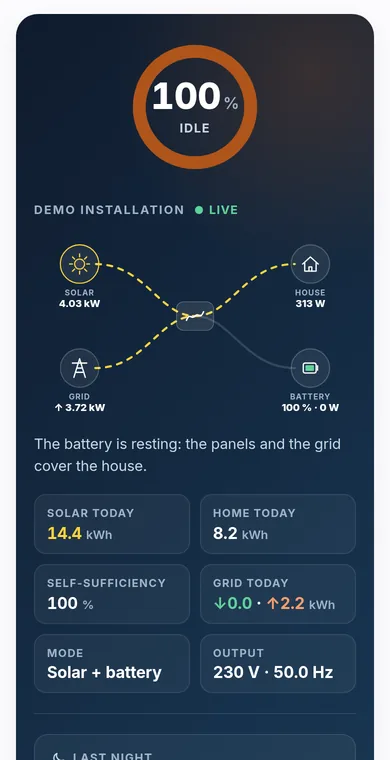
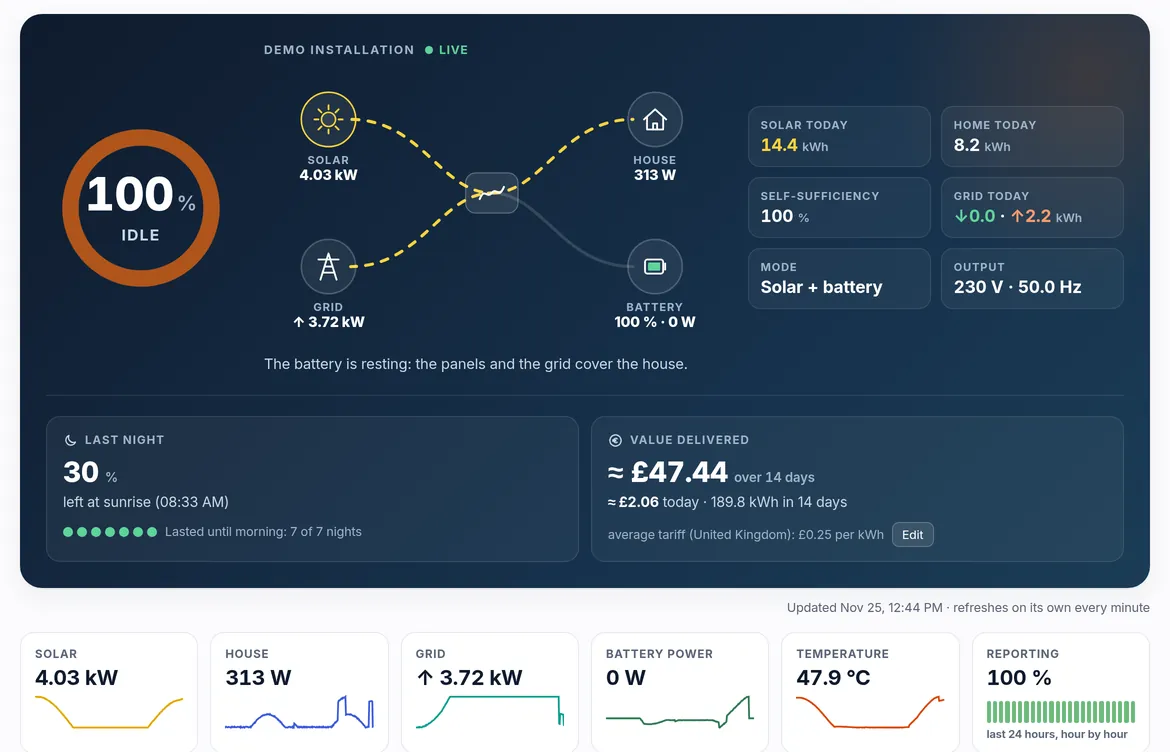
Online dashboard of Suntaic Monitor, demo mode
How it works

From your box to your phone, wherever you are

The box sends its readings out, encrypted. Nothing comes in: no port to open on your router, no VPN, no dynamic DNS.

Your Suntaic inverterread every few seconds
RS232
Suntaic Monitorat home, on your Wi-Fi
HTTPS · ≈ 2 min
The free Cloudhistory, alerts, sharing
anywhere
Your phone or PCany browser, no app
Switch it on

Three steps, two minutes

Off by default. Here is all it takes, with the real screens.

  1. 1Tick one box

    On the box’s page, Settings › Access key & Cloud: tick “Send readings to the free Cloud” and save. Copy the access key shown above it.

    Access key & Cloud

    Access key

    K7Q2M9XA41

    ✓Send readings to the free Cloud (suntaic-monitor.com)

    Save
  2. 2Sign in with your e-mail

    On suntaic-monitor.com/dashboard, type your e-mail: you get a one-time sign-in link. No password to remember.

    Sign in

    you@example.comSend me a sign-in link
  3. 3Link your box

    Paste the access key, give the box a name, done. The first readings appear within two minutes.

    Link your first box

    Access key

    K7Q2M9XA41

    Name

    GarageLink this box
Included

Everything, for free

Live dashboard from anywhereSolar, battery, grid and house, with the flows and the day so far.
Up to 3 years of historyZoom on any day, compare seasons, read the trend.
CSV exportEverything stored, ready for your spreadsheet.
E-mail alertsCharge, temperature, alarms, a box that goes silent: one e-mail per event.
Installer accessYour installer follows the system with their own access; you keep yours.
Private JSON linkFor a widget, IFTTT or Make: your live values, without opening anything at home.
Alerts

You choose what deserves an e-mail

Thresholds live in your account, one set per box. You get a single e-mail per event and no repeats until things are back to normal. The profile page adds a 6-hour silence alert for any box.

Examples of alerts →

Your data stays yours

Live demo

See your dashboard before it arrives

This is the real online dashboard, fed with simulated readings from a Suntaic inverter. Click around: no sign-up, nothing to install.

  • Health check in plain wordsGreen, amber or red for each point, with the reason.
  • Solar, battery, grid and loadLive flows and the day so far, refreshed every minute.
  • 14 days of energyProduction and consumption day by day, hour by hour.
  • Up to 3 years of curvesZoom on any day, export everything as CSV.

Open the live demo

In detail

The Cloud for Suntaic owners

The online dashboard

You see the values read by the box on the RS232 port: PV power and voltage, load power, output voltage, grid voltage, battery voltage with charge and discharge current, the operating mode, warnings and the solar energy produced today. The page refreshes every minute, with no port forwarding, no VPN and no inverter app.

Switching it on

  1. On the local dashboard at http://suntaic-monitor.local, open Settings > Access key & Cloud.
  2. Tick it, save, copy the access key.
  3. Sign in to the Cloud dashboard on this site with your e-mail and paste the key.

Two minutes later your inverter is online. The box only reads: your Suntaic settings stay untouched.

Three years of energy

The Cloud keeps up to three years of history: production, consumption, grid and battery day by day. It shows the effect of a cleaning of the panels, of a new appliance or of a longer winter. Any period can be exported as CSV.

A single e-mail when it goes quiet

If the box sends nothing for six hours, you get one e-mail. Often the internet link or the router is down, sometimes the inverter itself. One message until the box comes back.

Shared with your installer

An installer can sign in with their own e-mail and add the inverter with the access key you give them. You keep your own access and can change the key at any time.

Optional and free

The Cloud is off by default and has no subscription. Readings travel encrypted to a private link that only your key opens. Untick the option and sending stops immediately; we delete stored readings on request. Locally, the box works without it.

Questions about the Cloud

Is the Cloud really free?

Free, for good. Buying the box gives you the live dashboard, three years of history, CSV export and e-mail alerts, with nothing to pay each month.

Do I need a password?

No. You sign in with your e-mail: we send you a one-time link. Your box is linked to your account with its access key.

What happens if the internet goes down?

At home nothing stops: screen, local dashboard and Home Assistant carry on. The Cloud resumes by itself when the line comes back, and it can warn you by e-mail after 6 hours without news from the box.

Can someone else follow my system?

Yes. Your installer, or anyone you give the access key to, can link the box to their own account. You can change the key whenever you like.

How do I stop it and remove my data?

Switch the option off in the box settings: sending stops right away. Want the history gone too? Ask by e-mail and the stored readings are deleted.

All questions →

Keep reading

Check your Suntaic system from anywhere in the world

Order Suntaic Monitor. Ships within 3 working days, tested on a Suntaic inverter.

Plug & play: working in about a minute

Order for €59Ships within 3 working days · free cancellation until dispatch
Follow us on FacebookTips, news and real installations from our customers.
Follow