Solar
- PV voltage
- PV current
- PV power
- Each string, where the inverter has two
See at a glance whether the panels give what they should, and spot a shaded or dirty string.
Product
Smart home & Cloud
Ships within 3 working days · free cancellation until dispatch
Home / What Suntaic Monitor shows
The values you scroll through on the inverter screen, in one place, with history.
Plug & playPlug in, join your Wi-Fi, done: about a minute. No app, no tools, pre-configured for your Suntaic.See the 3 steps →
Read from the RS232 port, refreshed every few seconds, explained in plain words.
See at a glance whether the panels give what they should, and spot a shaded or dirty string.
Know whether the battery is filling or emptying right now, and how fast.
Catch a grid cut the minute it happens, even when you are away.
Find what your home really draws, day and night.
Grid, solar or battery mode: you know which source powers the house.
No more looking up a cryptic code in a PDF manual.
The exact list depends on your model and its firmware. Tell us your model when you order: your box is prepared and tested for it.
Pick a moment of the day: this is what Suntaic Monitor shows you, live, about your Suntaic system. Values simulated.
Raw numbers go in, useful answers come out: that is the job of the dashboard.
The share of your consumption covered by the sun and the battery, day by day.
What the panels produced each day, next to what the house used and what came from the grid.
At the current pace, when the battery will be full, or empty.
Solar, house, battery and grid in kWh, so a week of data tells you if the system is well sized.
Configure them one time in your free Cloud account, per box. Nothing needs to stay open on your phone.
Suntaic Monitor · just now
Grid cut: running on battery
The grid disappeared at 14:32. The inverter runs on solar and battery (64 %). You will get another e-mail when the grid is back.
Open the dashboard
The screen shows the present. The free Cloud keeps everything else.
What each option really gives you, in short.
| Inverter screen | Wi-Fi dongle and maker’s cloud | Suntaic Monitor | |
|---|---|---|---|
| Readable from anywhere in the world | — | ✓ | ✓ |
| Keeps working without internet | ✓ | — | ✓ |
| Home Assistant sensors without ESP32 or YAML | — | — | ✓ |
| A screen next to the equipment | ✓ | — | ✓ |
| Never changes a setting | — | — | ✓ |
| Group | Values |
|---|---|
| Photovoltaic | PV voltage, PV power |
| Battery | Battery voltage, charging current, discharging current, battery level |
| Grid | Grid voltage and frequency |
| Output | Output voltage and frequency, load power, load percentage |
| Inverter | Temperature, operating mode (grid, battery, fault) |
| Warnings | Active warnings and fault codes, in plain words |
http://suntaic-monitor.local.We start with the Hero and Rack ranges. Other Suntaic inverters that share the same communication should work too; tell us your model when you order and we check it.
Output priority, charger settings, battery type: nothing is changed. The box only asks the inverter for its status.
Open the same dashboard owners use, running on a simulated Suntaic inverter. No account needed.
Open the live demo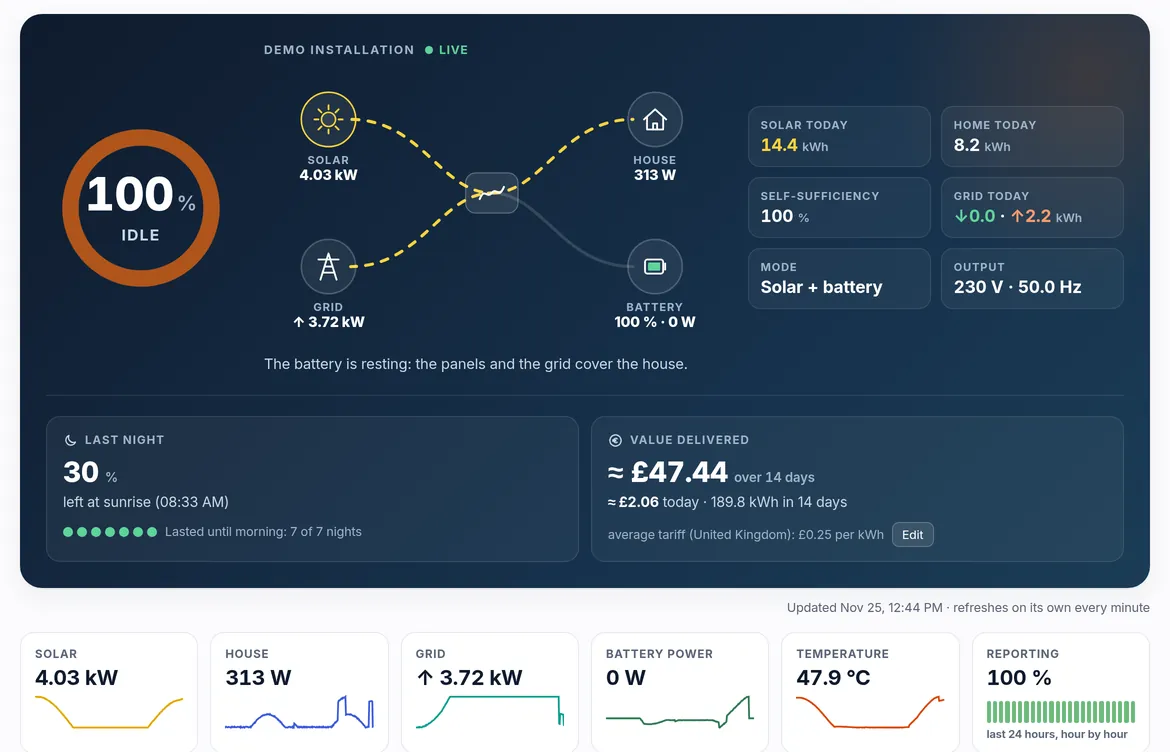
Order Suntaic Monitor. Ships within 3 working days, tested on a Suntaic inverter.
Plug & play: working in about a minute